
Changelog

Follow new updates and improvements to visualos.

v1.6 Mindmap Update - Three Layout Styles, Save Notes on a Node, Color-Coded Branches
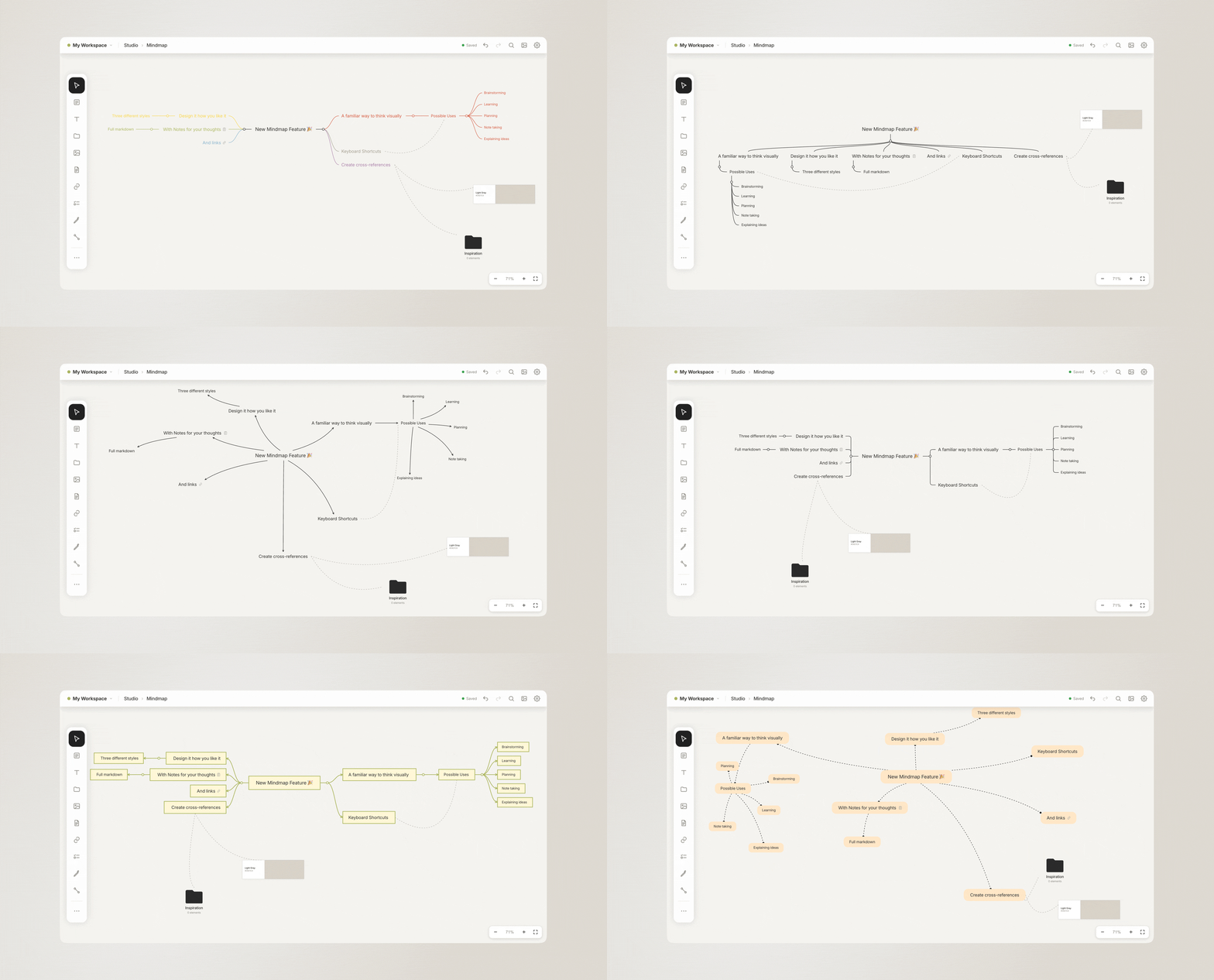
Mind mapping is an important part of our work and how we dig deep into a new topic for research. Many of you felt the same. So we wanted our mind maps to feel as free as possible but, on the other hand, as structured as necessary. With the ability to add notes to each node. Let us know what you think!

To try it out, please update to the latest version on your phone or Mac via the App Store or simply reload our browser page.

Full changelog for this release:

• New: Beautiful Mindmaps with three layouts and notes on every node
• Drag a free arrow by its line to move it
• Document preview now replicate the real rendering
• Fixed: The New Items pool no longer covers the toolbar
• Fixed: No more Image popin when switching boards
• Fixed: A single finger could zoom, or pinching stopped working, until the app was restarted

Mac app:
• Clicking into text puts the cursor right where you click – no more stray menus or selected words

Browser and Mac app:
• The mouse wheel can now zoom the board while you edit text
• Smaller fixes and improvements

If you’re missing anything, please contact us anytime.

Best,
Sarah & Gerald
v1.5.5 Search Inside Closed Docs, Edit Multiple Items at Once, Fixed Scribble on iPad

A small new update has been released today. We enabled the Scribble feature on the iPad for Apple Pencil users. Please let us know if it now works as expected. Besides that, we added a few quality-of-life changes, like editing multiple items of the same type at once and the possibility of bringing items back and to the front step by step.

The full changelog:

• iPad: Fixed Scribble to turn your handwriting into text
• Search now also finds text inside documents and to-do lists
• Search results show the matching passage, with your search term highlighted
• New Bring forward and Send backward, one layer at a time
• Select several items of the same kind and change them together
• Tapping into a document you scrolled down no longer jumps back to the top
• Many smaller improvements and fixes

If you’re missing anything, please contact us anytime. Meanwhile, we are working on your two most requested features 🤫 stay tuned!

Best,
Sarah & Gerald

v1.5.4 Save Own Colors, Flip Images, Dashed & Dotted Lines, Formulas, Own Subreddit, and Many Quality of Life Improvements

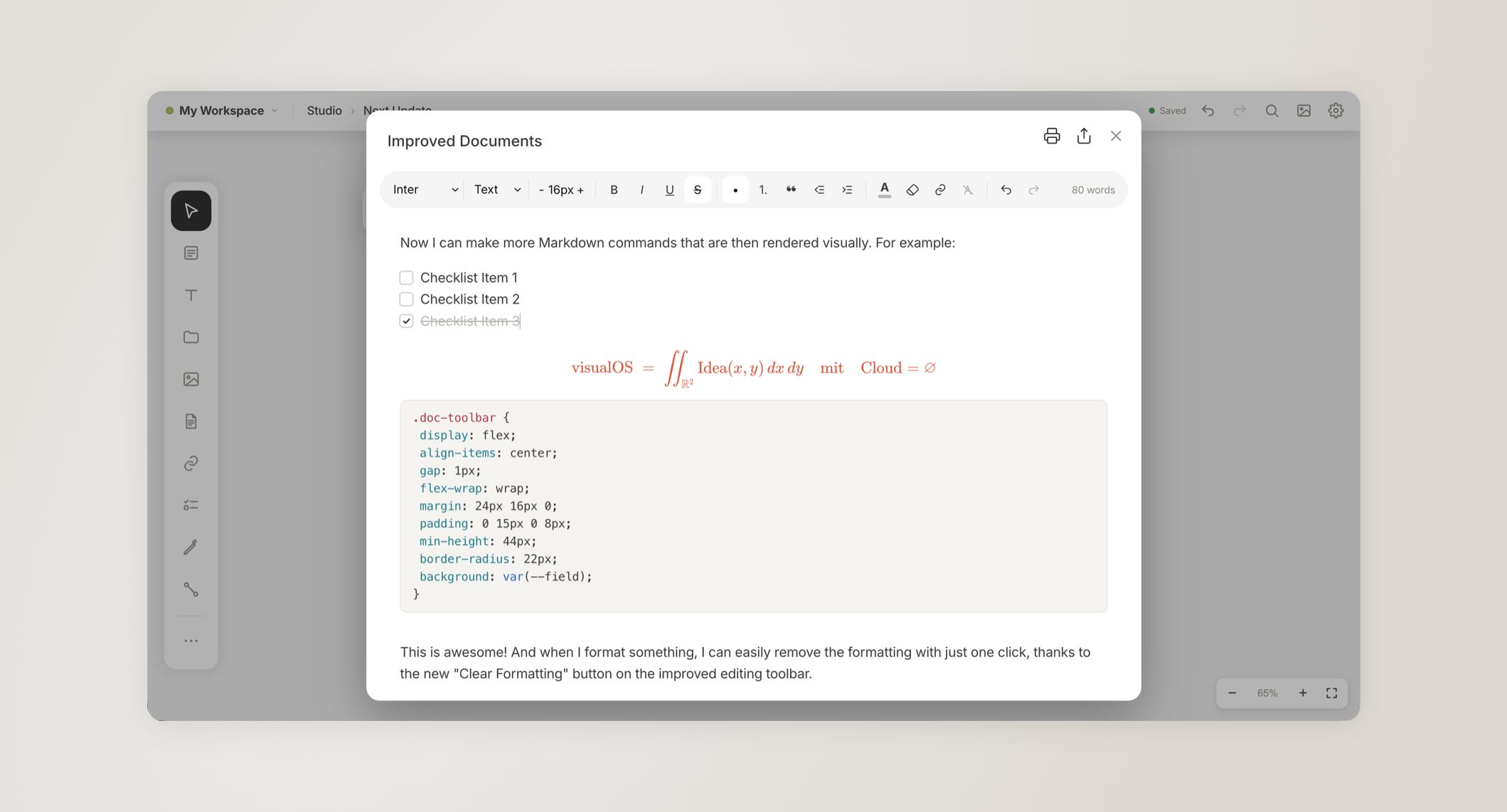
Today our newest update has been released. We have reworked and improved many small details that you have discovered and suggested. Flipping images, saving your own brand colors, formulas, and more markdown features in the editor.

If you are following our development and like what we built with visualOS, please consider leaving an honest review in the App Store or on AlternativeTo to spread the word. We would really appreciate it.

Besides that, we have created our own subreddit 🎉 r/visualos where we meet other visual thinkers, share workflows, and help each other. If you want to stay updated or exchange with the community, we are excited to see you there.

Please update to the latest version of visualOS. The browser version has already been updated.

Complete changelog:

• Save your own colors and reuse them in the color pickers
• Pictures: add a frame, round the corners and flip them
• Documents: to-do items, code with syntax colors, math formulas
• Syncing starts sooner after you open the app
• Long-press the board to paste
• Documents: a new toolbar with a Clear formatting button
• Paste a table onto the board or into a document, and it stays a real table
• Copied elements keep the arrows between them
• Pictures and videos keep their proportions when you resize them by a corner
• Copy link cards to paste clean links into other apps
• Dashed and dotted lines, arrows and shape borders, with more stroke widths
• To-do lists: pick a font, size and color, and style the heading
• Choose your own grid size
• Selections are easier to see in dark mode
• Many smaller improvements and fixes

Mac app:

• Hold Shift to resize a picture or video freely
• Zoom to your selection with Shift+2
• Keyboard shortcuts: see every shortcut in Settings and choose your own keys
• Hold Shift to drag in a straight line
• Hold Option to drag a copy
• Press Enter to edit the selected item
• Hold Option to resize from the center
• Dragging an item right after clicking it no longer opens it
• ⌘Z and other shortcuts work right after typing or pressing Esc

If you’re missing anything, please contact us anytime.

Best,
Sarah & Gerald

Earlier updates